
The Upload Support Files feature allows users to attach documents or files when responding to clarification requests. This ensures clear communication and helps resolve clarifications more efficiently.
When to use this feature:
- Providing additional documents requested during clarification
- Sharing screenshots, reports, or supporting evidence
- Avoiding back-and-forth communication due to missing information
How to upload support files in Clarification:
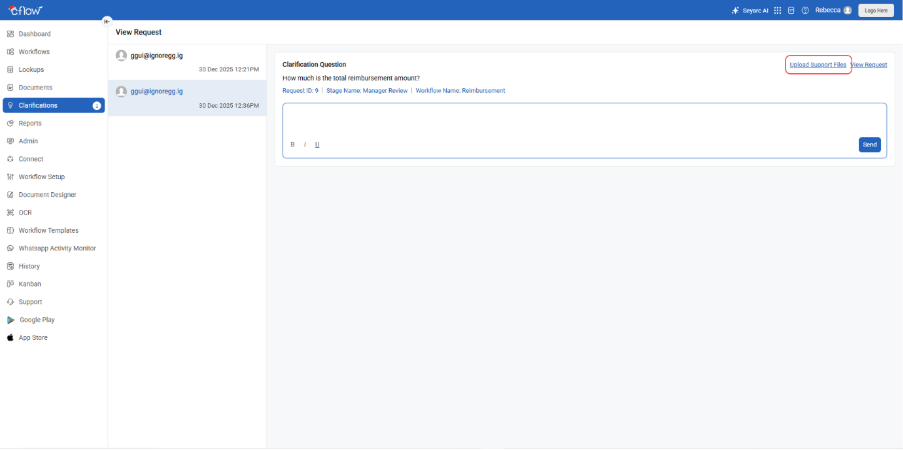
- Go to Clarification from the main menu.
- Select the required clarification from the list.
- Click Upload Support Files.
- Upload the necessary file(s) from your system.
- Enter your response in the clarification reply box.
- Submit the clarification response.
After submitting the response:

- The receiver will receive your reply along with the attached files.
- All uploaded files remain linked to the clarification for future reference.
- This ensures transparency and faster resolution.
FAQs
1. What is the Upload Support Files feature?
This feature allows users to attach files when responding to a clarification request.
2. When should I upload support files?
You should upload support files when additional documents, screenshots, or evidence are required to answer a clarification.
3. Where can I upload support files?
Open the required clarification from the Clarification list and click Upload Support Files.
4. Will the receiver see the uploaded files?
Yes. The receiver will receive the clarification response along with the attached files.
5. Are the uploaded files saved for future reference?
Yes. All uploaded support files remain attached to the clarification and can be accessed later if needed.