
What is Round-Robin Reviewer Assignment?
Round-Robin Reviewer Assignment is a feature in Cflow that ensures workflow review tasks are distributed equally and automatically among all reviewers in a role.
Instead of all reviewers receiving every request (default behavior), Round-Robin assigns each incoming request to only one reviewer in a rotating sequence.
This helps maintain fair workload distribution, improves accountability, and prevents specific users from receiving too many requests.
How It Works
- Single Reviewer Assignment
When a request enters a stage with Round-Robin enabled:
- Only one reviewer is automatically assigned.
- Only that reviewer will:
- Receive notifications
- See the request in their Inbox
- Approve or reject the request
- Sequential Rotation
Assignments rotate in order among the reviewers.
Example (Alice → Bob → Carol → Alice → …)
- Automatic Skipping
Cflow automatically skips:
- Inactive users
- Disabled users
- Deleted users
- Delegation Support
If the reviewer has a delegate rule:
- The delegate receives the task
OR - The system skips the absent reviewer and moves to the next user
- Request Movement
Once the assigned reviewer approves or rejects, the request moves to the next stage as per workflow settings.
Where to Enable Round-Robin
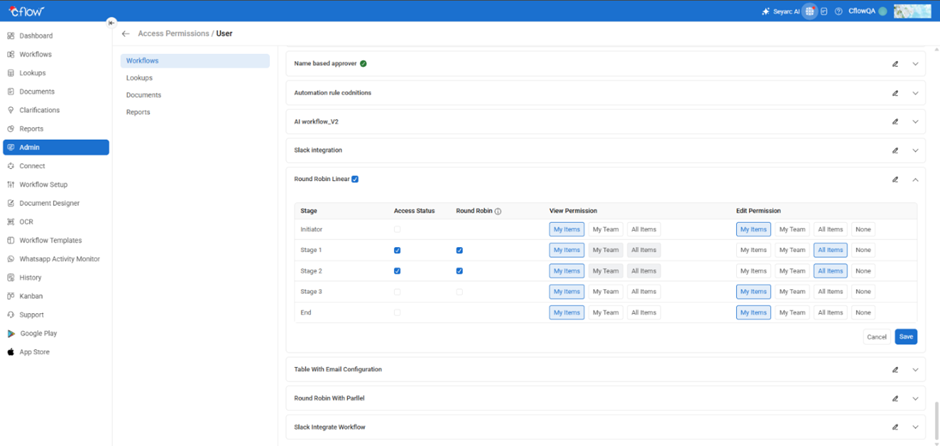
ou can enable Round-Robin Reviewer Assignment directly from the Access Permissions section in Cflow.
Steps to Enable Round Robin:
- Go to the Admin menu.
- Open the Access Permissions tab.
- From the list of roles, click on any role.
- By default, all workflows associated with that role will be displayed.
- Select the workflow you want to configure and click Edit Workflow.
- In the workflow stages list, you will see a Round Robin column for all stages except Initiator and End.
- To enable Round Robin for a stage, simply check the box in the Round Robin column.
- When you enable Round Robin, the Access Status for that stage will automatically be turned ON if it is not already enabled.
- After selecting the required stages, click Save.
“When enabled, review tasks for this stage will be automatically distributed among reviewers in a sequential round-robin order. Only the assigned reviewer will receive notifications and approval access.”
Example Scenario
Reviewer Role Members: Alice, Bob, Carol
Incoming Requests:
| Request ID | Assigned Reviewer |
| #101 | Alice |
| #102 | Bob |
| #103 | Carol |
| #104 | Alice |
| #105 | Bob |
This ensures fair workload for all reviewers.
Audit Trail
Cflow maintains complete logs of:
- Assigned reviewer
- Assignment method (round-robin or manual override)
- Action timestamps
- Sequence of assignments
This provides full transparency and tracking for administrators.
What Happens If…?
✔ All reviewers are inactive
The system cannot assign the request.
✔ A new reviewer is added
Round-robin rotation automatically recalculates for the next assignment.
✔ A reviewer is removed
The user is skipped automatically in future assignments.
Key Benefits
- Fair and balanced distribution of approval tasks
- Faster review cycles
- Less manual intervention
- Improved accountability
- Better visibility and transparency
FAQs
1. Can multiple reviewers approve a request in Round-Robin mode?
No. Only one reviewer is assigned and allowed to act.
2. Does this affect other workflow stages?
No. Round-Robin applies only to the specific stage where it is enabled.
3. Will reviewers see tasks not assigned to them?
No. Only the designated reviewer sees the task.
4. Can we disable Round-Robin later?
Yes, at any time.
5. What if a reviewer has a delegate?
The delegate will receive the assignment automatically.