
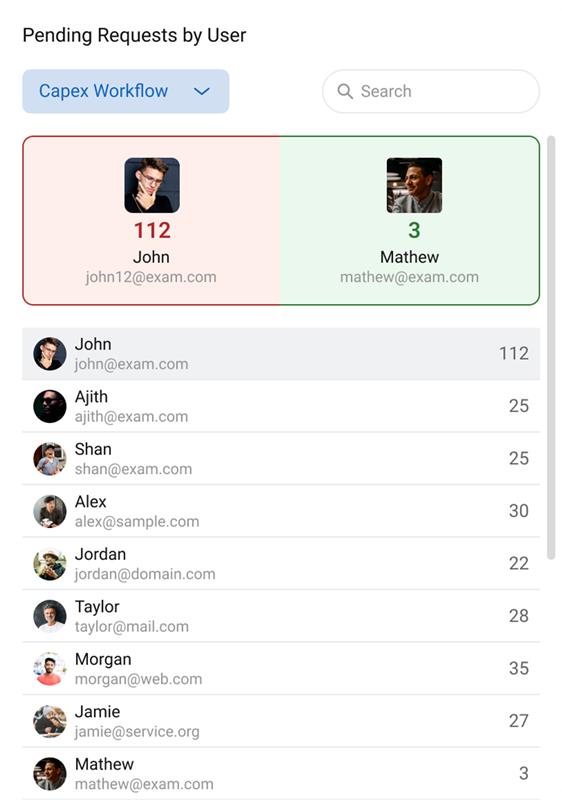
The Pending Requests by User widget gives a clear view of pending approval requests for users across selected workflows. Visibility in the widget is strictly based on access permissions, ensuring each user sees only what they are allowed to view.
🧩 Adding the Widget to Your Dashboard
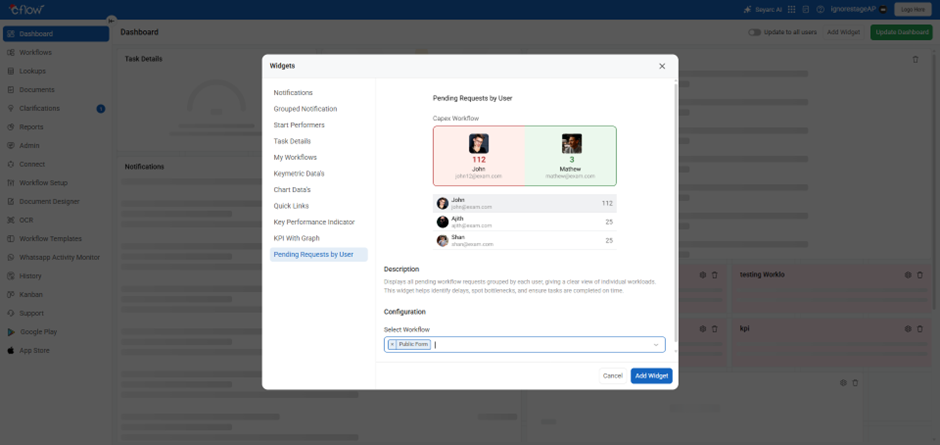
- Go to the Dashboard menu.
- Click Edit Dashboard.
- Click Add Widget.
- Select Pending Requests by User from the widget list.
- In the configuration screen:
- Admins see all workflows.
- Workflow Administrators see workflows they manage.
- Non-admin users see workflows they are associated with.
- Click Add Widget to save the widget.
Once added, you can switch between workflows to review pending request information based on your permissions.
👀 Widget Overview
1️⃣ Workflow Dropdown
Allows switching between configured workflows.
Data shown is permission-based.
2️⃣ Showcase Section (Visible only if you have access to multiple users)
- Red Box → User with the highest number of pending requests.
- Green Box → User with the lowest number of pending requests.
Important:
The showcase will display only the users whom you are allowed to view based on your access permissions.
3️⃣ User List
Shows:
- User photo
- Username
- Pending request count
✔ Who can see which users?
Visibility is completely determined by access permissions:
| Role | What do they see? |
| Any Role | Users they have access to based on workflow permissions. Not automatically all users. |
Even Admin and Workflow Admin roles will not see all users unless they have access permission for those users and workflows.
1. Why am I not seeing all the users in the workflow?
User visibility is controlled by access permissions.
Even Admins see only users they have access to.
2. Why do I see only my own pending count?
You do not have elevated permissions.
Only admins or workflow admins can see multiple users.
3. Why does the showcase show fewer users?
Only users you have access to are included in the calculations.
4. Why do search results show fewer pending counts?
Counts from workflows you do not have permission to access are not included.